<?xml version="1.0" encoding="UTF-8"?><feed xmlns="http://www.w3.org/2005/Atom"><id>https://vic.demuzere.be/articles/tags/security/atom.xml</id><title>Vic Demuzere - Security</title><link href="https://vic.demuzere.be/articles/tags/security/atom.xml" rel="self" type="application/atom+xml" /><link href="https://vic.demuzere.be/articles/tags/security/" rel="alternate" type="text/html" /><updated>2025-02-06T21:00:00+00:00</updated><author><name>Vic Demuzere</name></author><entry><id>https://vic.demuzere.be/articles/matching-public-private-key/</id><title>Check whether public and private key match</title><link href="https://vic.demuzere.be/articles/matching-public-private-key/" rel="alternate" /><updated>2025-02-07T10:59:22+00:00</updated><published>2025-02-06T21:00:00+00:00</published><content type="html"><![CDATA[<p>Customers regularly send me x509 key pairs at work<sup class="footnote-ref"><a href="#fn-1" id="fnref-1" data-footnote-ref>1</a></sup>.
Most of the time these have been forwarded a few times already, and people tend to mess up the files.
This means that the public and private keys don't match anymore, and I have to ask for a new pair.</p>
<p>Luckily, we can use OpenSSL to check whether a public and private key match.</p>
<h2 id="for-rsa-keys">For RSA keys<a href="#for-rsa-keys" aria-label="Link to heading 'For RSA keys'" data-heading-content="For RSA keys" class="anchor"></a></h2>
<p>The classic way to compare RSA keys is to check whether the <strong>modulus</strong> is the same, as this is the only part that is shared between the public and private keys.
If the modulus isn't the same, the keys can't form a pair.</p>
<p>Read the modulus from the <strong>public key</strong>:</p>
<pre><code>openssl rsa -pubin -in public.pem -modulus -noout | openssl sha1
</code></pre>
<p>Then do the same with the <strong>private RSA</strong> key:</p>
<pre><code>openssl rsa -in private.pem -modulus -noout | openssl sha1
</code></pre>
<p>If the two values match, the key files form a pair.</p>
<p>Note that we're piping the actual output of the <code>-modulus</code> command to <code>openssl sha1</code> to get a shorter hash of the modulus.
This makes it easier to manually compare the two values, but it's not strictly necessary.
You could also compare the output directly if you're feeling brave.</p>
<h2 id="for-ec-keys">For EC keys<a href="#for-ec-keys" aria-label="Link to heading 'For EC keys'" data-heading-content="For EC keys" class="anchor"></a></h2>
<p>Elliptic curve keys don't have an easy-to-compare modulus like the RSA keys above had.
However, it's always possible to generate the public key<sup class="footnote-ref"><a href="#fn-2" id="fnref-2" data-footnote-ref>2</a></sup> part when we have the private key.</p>
<p>Using the <strong>private key</strong>, generate (a hash of) the public key:</p>
<pre><code>openssl pkey -pubout -in private.pem | openssl sha1
</code></pre>
<p>Then compare the output with the <strong>public key</strong> file you have.
We need to make <code>openssl</code> load it and print it out again to make sure we get the exact same format.</p>
<pre><code>openssl x509 -pubkey -in public.pem -noout | openssl sha1
</code></pre>
<p>If the two values match, these keys form a pair.</p>
<section class="footnotes" data-footnotes>
<ol>
<li id="fn-1">
<p>Please don't do this. Ask the company that needs a certificate to generate a private key and provide you with a <a href="https://en.wikipedia.org/wiki/Certificate_signing_request">Certificate Signing Request (CSR)</a>. This way, you don't have to handle the private key at all. <a href="#fnref-1" class="footnote-backref" data-footnote-backref data-footnote-backref-idx="1" aria-label="Back to reference 1">↩</a></p>
</li>
<li id="fn-2">
<p>When people say &quot;public key&quot; in the context of a x509 pair they usually refer to the certificate. The public key we're extracting here is the actual cryptographic public key, it doesn't contain the extra data like domain names that a certificate usually holds. You can't recover the full certificate when you only have the private key. <a href="#fnref-2" class="footnote-backref" data-footnote-backref data-footnote-backref-idx="2" aria-label="Back to reference 2">↩</a></p>
</li>
</ol>
</section>
<div class="footer"><hr><p>Thanks for subscribing to my feed!</p><p>Feel free to e-mail comments or corrections to <a href="mailto:vic@demuzere.be?subject=RE%3A%20Check%20whether%20public%20and%20private%20key%20match">vic@demuzere.be</a>.</p></div>]]></content></entry><entry><id>https://vic.demuzere.be/articles/pwgen-not-secure-by-default/</id><title>Today I learned pwgen is not secure by default</title><link href="https://vic.demuzere.be/articles/pwgen-not-secure-by-default/" rel="alternate" /><updated>2024-11-11T18:19:13+00:00</updated><published>2022-05-29T14:23:58+00:00</published><content type="html"><![CDATA[<p>Command-line tool <a href="https://sourceforge.net/projects/pwgen/" title="Official pwgen pages on Sourceforge"><code>pwgen</code></a> is a well known tool to generate a list of passwords.
I use it almost daily: when creating new accounts on remote servers, or when I want to encrypt sensitive data with a temporary password to send to a customer.
Sometimes opening my terminal and typing <code>pwgen 30 1</code> is faster than getting to the generator in my password manager.<sup class="footnote-ref"><a href="#fn-manager" id="fnref-manager" data-footnote-ref>1</a></sup></p>
<p>I had noticed before that the passwords generated by <code>pwgen</code> seemed to contain patterns: repeating vowels is something that stands out.
I hadn't thought about it much, until I saw a colleague type <code>pwgen -s</code> at his terminal.</p>
<h2 id="what-is-this--s">What is this <code>-s</code>?<a href="#what-is-this--s" aria-label="Link to heading 'What is this -s?'" data-heading-content="What is this -s?" class="anchor"></a></h2>
<p>As with most unix-y tools, a quick glance at <a href="https://man.archlinux.org/man/pwgen.1" title="pwgen man page">the <em>man page</em></a> tells us everything we want to know.
The <code>-s</code> is shorthand for <code>--secure</code>:</p>
<blockquote>
<p>Generate completely random, hard-to-memorize passwords.
These should only be used for machine passwords, since otherwise it's almost guaranteed that users will simply write the password on a piece of paper taped to the monitor...</p>
</blockquote>
<p>As it turns out, <code>pwgen</code> actually doesn't generate secure passwords by default.
The passwords it generates are <em>designed to be easily memorized</em>.
That explains the patterns I noticed before!<sup class="footnote-ref"><a href="#fn-man" id="fnref-man" data-footnote-ref>2</a></sup></p>
<section class="footnotes" data-footnotes>
<ol>
<li id="fn-manager">
<p><a href="https://keepassxc.org/">KeepassXC</a> is a great password manager with local storage. <a href="#fnref-manager" class="footnote-backref" data-footnote-backref data-footnote-backref-idx="1" aria-label="Back to reference 1">↩</a></p>
</li>
<li id="fn-man">
<p>I should have checked the man page right away: patterns are a red flag in cryptography. <a href="#fnref-man" class="footnote-backref" data-footnote-backref data-footnote-backref-idx="2" aria-label="Back to reference 2">↩</a></p>
</li>
</ol>
</section>
<div class="footer"><hr><p>Thanks for subscribing to my feed!</p><p>Feel free to e-mail comments or corrections to <a href="mailto:vic@demuzere.be?subject=RE%3A%20Today%20I%20learned%20pwgen%20is%20not%20secure%20by%20default">vic@demuzere.be</a>.</p></div>]]></content></entry><entry><id>https://vic.demuzere.be/articles/lastpass-was-not-the-last-keepass/</id><title>LastPass was not the last after all</title><link href="https://vic.demuzere.be/articles/lastpass-was-not-the-last-keepass/" rel="alternate" /><updated>2026-05-13T17:27:26+00:00</updated><published>2017-04-22T12:46:00+00:00</published><content type="html"><![CDATA[<p>LastPass has been getting quite a bit of media attention lately.
Security researchers have been uncovering not one but multiple serious security issues:
The most recent one <a href="http://www.martinvigo.com/design-flaws-lastpass-2fa-implementation/" title="LastPass 2FA flaw">rendering 2-factor authentication useless</a>, others <a href="https://bugs.chromium.org/p/project-zero/issues/detail?id=1209" title="LastPass remote code execution">allowing third parties to execute code on your computer</a> or simply <a href="https://labs.detectify.com/2016/07/27/how-i-made-lastpass-give-me-all-your-passwords/" title="Stealing credentials stored in LastPass">stealing the passwords you've saved</a>.</p>
<p><img src="https://vic.demuzere.be/assets/articles/images/lAQMQ0mm7vRn2OAHfTXiWnBuVtBr00VC.jpg" alt="A really realistic depiction of a hacker" /></p>
<p>They've been really great in responding to these problems:
publishing more than enough information on their website and fixing the issues blazingly fast.
However, the number of issues we're currently seeing shows that they've done no independent security audit.
(Or maybe they have, but in that case they seem to have paid monkeys instead of security experts.)</p>
<p>Another reason to leave LastPass is the issues I've had with synchronisation lately.
Changing data in your vault, only to see it disappear after you've restarted the application is horrible.
I've had to reset quite a lot of passwords in the last few months.</p>
<h2 id="back-to-keepass">Back to KeePass<a href="#back-to-keepass" aria-label="Link to heading 'Back to KeePass'" data-heading-content="Back to KeePass" class="anchor"></a></h2>
<p>Before LastPass I had been using <a href="https://www.keepassx.org/" title="KeePassX">KeePassX</a> for a while, which is a Qt port of the well known <a href="http://keepass.info/" title="KeePass">KeePass</a> password manager.
The problem with that piece of software is that filling passwords automatically didn't really work on all platforms.
As I had to use macOS at work, this really wasn't an option anymore.
Having to manually copy and paste passwords makes for a horrible experience, especially in time critical situations.</p>
<p>During my two years with Lastpass, however, an alternative popped up!</p>
<h2 id="meet-keepassxc">Meet KeePassXC<a href="#meet-keepassxc" aria-label="Link to heading 'Meet KeePassXC'" data-heading-content="Meet KeePassXC" class="anchor"></a></h2>
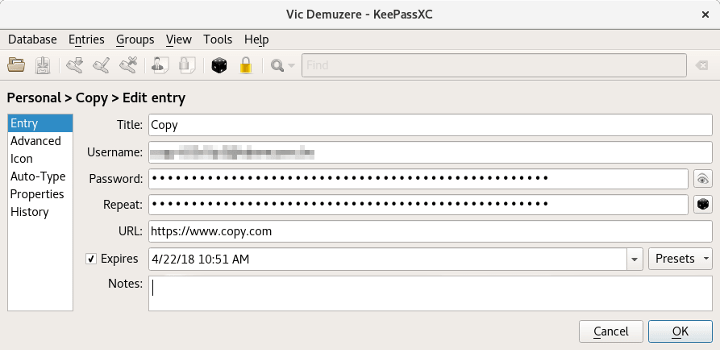
<p><a href="https://keepassxc.org/" title="KeePassXC">KeePassXC</a> is a fork of <a href="https://www.keepassx.org/" title="KeePassX">KeePassX</a>, and they've added more than a letter!
Development on their <a href="https://github.com/keepassxreboot/keepassxc" title="KeePassXC on github">Github</a> page is going fast.
The currently released version is pretty good, the next one has new goodies such as OTP code generation with autofill.
Most important: it supports autofill in both browser and other applications on Windows, Linux and MacOS.</p>
<p><img src="https://vic.demuzere.be/assets/articles/images/EjQgYqCewx2sPG4FmJtEXAQ0MHnMsUNc.png" alt="Editing a password in KeePassXC on linux" /></p>
<p>Let's be honest: when it comes to browser support, LastPass is amazing.
However, combined with third-party browser plugins (over the KeePassHTTP protocol) using KeePassXC in browsers is just fine.
The browser plugin does not access your password database directly, but has to ask for every password it wants to use.
At this point, the desktop client asks for your permission before even sending the password to your browser.</p>
<h3 id="keeping-things-in-sync">Keeping things in sync<a href="#keeping-things-in-sync" aria-label="Link to heading 'Keeping things in sync'" data-heading-content="Keeping things in sync" class="anchor"></a></h3>
<p>As with the other KeePass-apps, there is no built-in synchronisation.
The password database is stored as a single encrypted file.
It's up to you to make sure this file is available wherever you'll need your passwords.
<a href="https://keepassxc.org/" title="KeePassXC">KeePassXC</a> is able to merge databases, and does so automatically when the open database file is modified by another process.
This makes it slightly easier to use KeePassXC with apps like <a href="https://syncthing.net/" title="Syncthing">Syncthing</a> or Dropbox.</p>
<div class="footer"><hr><p>Thanks for subscribing to my feed!</p><p>Feel free to e-mail comments or corrections to <a href="mailto:vic@demuzere.be?subject=RE%3A%20LastPass%20was%20not%20the%20last%20after%20all">vic@demuzere.be</a>.</p></div>]]></content></entry><entry><id>https://vic.demuzere.be/articles/how-authy-cripples-my-2fa-experience/</id><title>How Authy cripples my 2FA experience</title><link href="https://vic.demuzere.be/articles/how-authy-cripples-my-2fa-experience/" rel="alternate" /><updated>2026-05-13T17:23:33+00:00</updated><published>2015-03-11T17:46:16+00:00</published><content type="html"><![CDATA[<p>Security on web services has improved a lot lately. Most of them have switched to being available over HTTPS only, use decent hashing and encryption for user credentials and <a href="https://twofactorauth.org/" title="Services supporting two-factor authenication">support two-factor authentication</a> by now. <a href="https://www.authy.com/" title="Authy">Authy</a> provides an easy to use two-factor solution for organizations. However, this seems to be a bit of a poisoned gift.</p>
<h2 id="why-do-we-need-two-factor-authentication">Why do we need two-factor authentication?<a href="#why-do-we-need-two-factor-authentication" aria-label="Link to heading 'Why do we need two-factor authentication?'" data-heading-content="Why do we need two-factor authentication?" class="anchor"></a></h2>
<p>Online authentication used to rely on remembering a password. This is by far the easiest solution, but it has a few drawbacks. People are bad at remembering things, especially if they don't use them every day. This results in passwords being written down and attached to computer screens and keyboards. Even worse is that most people <strong>use the same password for every site they visit</strong>.</p>
<p>Using the same password on multiple sites becomes a problem when one of them leaks user credentials. Trying out the leaked username/e-mail and password combinations may give access to a lot of other sites, creating an avalanche effect.</p>
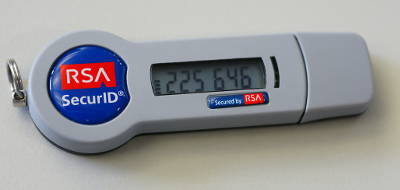
<p>Two-factor authentication attempts to solve this problem by <em>combining the password with a physical item</em>. A mobile device or hardware token generates an access code, usable for a limited time only. This means that someone who knows your password is still unable to access your account. Great!</p>
<p><img src="https://vic.demuzere.be/assets/articles/images/TRYl3DRF0rsyvqqnV0drAUMoq12Qb1Mn.jpg" alt="A hardware two-factor authentication token" /></p>
<h2 id="how-does-two-factor-authentication-work">How does two-factor authentication work?<a href="#how-does-two-factor-authentication-work" aria-label="Link to heading 'How does two-factor authentication work?'" data-heading-content="How does two-factor authentication work?" class="anchor"></a></h2>
<p>An authenticator app generates an access code based on a secret and the current time. This code changes every 30 seconds, but can usually be used for about 5 minutes. Every site gives you a unique secret, and thus you can't use a single code for multiple sites.</p>
<p>Notice that I talk about &quot;<em>an authenticator app</em>&quot; and not a specific application? These services support the <a href="http://tools.ietf.org/html/rfc4226" title="HOTP RFC">TOTP</a> or <a href="http://tools.ietf.org/html/rfc6238" title="TOPT RFC">HOTP</a> standard. There are a lot of applications that allow you to generate these access codes. The most well-known is the <a href="https://en.wikipedia.org/wiki/Google_Authenticator" title="Google Authenticator">Google Authenticator</a>, but there are many more! On every platform and for every device. Even if you're using a 10 year old smartphone, chances are you'll find a suitable two-factor application.</p>
<h2 id="and-then-there-was-authy">And then there was Authy<a href="#and-then-there-was-authy" aria-label="Link to heading 'And then there was Authy'" data-heading-content="And then there was Authy" class="anchor"></a></h2>
<p>Authy provides a solution for websites that makes it easy to implement two-factor authentication. This is a good thing as it allows more organisations to use 2FA. Their own authenticator app provides a few extra features too. Unfortunately, in order to do this, they decided to <em>take an open standard and completely break it</em>. They <strong>deliberately prevent</strong> you from using any other app than their own. As usual, this is a one way situation: you can import other accounts to authy, but not the other way around.</p>
<p>When asked about other apps, their customer support replied:</p>
<blockquote>
<p>Are you asking about using Authy-powered tokens with third-party apps? If so, we do not support that feature, but many of our clients support authentication via SMS or phone calls.</p>
</blockquote>
<p>Sure, their own app has a few amazing features. It allows you to backup an encrypted copy of your secret keys to the cloud, for example. But is that worth it? What if you're using a platform that doesn't have an Authy app? As more organisations switch to Authy, <strong>they are effectively ending the freedom of choice</strong> when it comes to authenticator apps.</p>
<p>Is this a bad thing? Up to you to decide.</p>
<div class="footer"><hr><p>Thanks for subscribing to my feed!</p><p>Feel free to e-mail comments or corrections to <a href="mailto:vic@demuzere.be?subject=RE%3A%20How%20Authy%20cripples%20my%202FA%20experience">vic@demuzere.be</a>.</p></div>]]></content></entry><entry><id>https://vic.demuzere.be/articles/pgp-public-keys/</id><title>Verifying the identity behind a PGP public key</title><link href="https://vic.demuzere.be/articles/pgp-public-keys/" rel="alternate" /><updated>2024-11-11T17:39:14+00:00</updated><published>2015-01-22T18:44:00+00:00</published><content type="html"><![CDATA[<p>Your PGP keyring contains public keys that <strong>claim</strong> to represent someone you know. Getting those keys there is easy: using the keyserver network, they can be downloaded right from your PGP client! Lots of people publish their keys on their website as well. But how do you know for sure that <em>a certain key really represents a certain person</em>? I could create a public key using your name and e-mail address, <em>nobody keeps me from doing that</em>.</p>
<h2 id="signing-public-keys">Signing public keys<a href="#signing-public-keys" aria-label="Link to heading 'Signing public keys'" data-heading-content="Signing public keys" class="anchor"></a></h2>
<p>The GPG software allows you to sign other public keys, similar to how you can sign messages or basically any kind of data. Signing a public key however, <em>has a special meaning</em>. You declare that that, according to you, the key you've signed is real and really represents the listed person or organisation.</p>
<p>There are four signature levels:</p>
<ul>
<li>Level 0 signature: <strong>no indication</strong>. This is the default level and is usually used by people who don't know or don't care about signature levels. A lot of people don't specify the signature level when they sign public keys, so there is no reason to discard these right away.</li>
<li>Level 1 signature: <strong>personal belief but no verification</strong>. As the name says this level is used when someone signs a key but was unable to verify the identity. Used for nicknames, most of the time, as you can't really prove the identity behind a pseudonym. Be careful when you encounter a level 1 signature on a key with a full name and e-mail address. These levels have to be specified manually, if someone changes it to level 1, it might be for a reason.</li>
<li>Level 2 signature: <strong>casual verification</strong>: These signatures usually mean that people have met and checked identification, but didn't know each other upfront.</li>
<li>Level 3 signature: <strong>extensive verification</strong>: The level used when the signer was absolutely sure that the listed name is correct. Usually this means that they have known each other in person for years and have checked government issues identification.</li>
</ul>
<p>Note that this is the theory. The signature level names (indicated above) are listed in the <a href="https://gnupg.org/documentation/manuals/gnupg/" title="GPG manpage">GPG documentation</a>. The explanation of these levels is unclear and usually very personal. People use them in different ways, and some even have a webpage explaining what their levels mean. And then there's the huge group that only uses level 0 signatures. So in the end, they're just a vague indication.</p>
<p>If you are able to verify the owner of a public key, sign their public key. Most graphical frontends for PGP have an easy way to do this, the command below signs a key using the command line:</p>
<pre><code>$ gpg --sign-key &lt;name&gt;
</code></pre>
<p>But why are these signatures important?</p>
<h2 id="introducing-the-web-of-trust">Introducing the Web of Trust<a href="#introducing-the-web-of-trust" aria-label="Link to heading 'Introducing the Web of Trust'" data-heading-content="Introducing the Web of Trust" class="anchor"></a></h2>
<p>You can't know everyone, that's just impossible. I am aware that some people claim to have thousands of friends on social networks, but seriously? However, the people that you know may overlap with the ones I know. What is the easiest solution when you need someone's phone number but have no means to communicate? Ask a mutual friend! And that's how the Web of Trust works.</p>
<p>Let's say that you have a personal friend <a href="https://en.wikipedia.org/wiki/Alice_and_Bob" title="Alice and Bob">Alice</a> and want to send an encrypted message to Bob. You met Bob on an online message board and don't know him in person. You could ask Bob to verify the fingerprint of his public key, but someone might be tampering with the connection. It's possible to verify the identity of an internet stranger without meeting him, but it's pretty hard.</p>
<p>Fortunately Alice knows Bob in person, and we are able to verify Alice's key as we can meet her. We could use encrypted and signed communication to ask Alice if the key we have for Bob is correct. But if Alice has signed Bob's key, we don't even have to talk to her! As we trust Alice and her signatures, we are assured that Bob's key is correct.</p>
<pre><code>You --&gt; Alice --&gt; Bob
</code></pre>
<p>The more keys you sign and the more people sign yours, the easier it becomes to identify the correct public keys for other people. So when you meet someone that uses PGP, attempt to sign each other's keys. And <strong>never sign a key if you are not sure about the person's identity</strong>. The strength of the web of trust is your responsibility.</p>
<h2 id="trust-levels">Trust levels<a href="#trust-levels" aria-label="Link to heading 'Trust levels'" data-heading-content="Trust levels" class="anchor"></a></h2>
<p>Similar to signature levels, PGP also has a concept called trust levels. You can assign <em>trust</em> to keys in your keyring. This level indicates how much you trust a person's ability to sign other keys.</p>
<p>There are 5 levels:</p>
<ul>
<li><strong>Unknown</strong>: The default level for keys.</li>
<li><strong>None</strong>: These signatures are ignored completely when calculating the web of trust. Use this when you think someone is not able to make trustworthy signatures.</li>
<li><strong>Marginal</strong>: You have marginal trust in the owner of this key, but don't believe them if they're the only one signing a key. Their signatures are accepted if multiple marginally trusted keys sign the same public key. This level will probably be used the most in your keyring.</li>
<li><strong>Full</strong>: You trust the owner of this key completely. When this person signs a public key, the software trusts that signature as if you have signed it yourself.</li>
<li><strong>Ultimate</strong>: Use this level for your own keys.</li>
</ul>
<p>To modify the trust level of a key using the command line, edit keys in interactive mode and use the <code>trust</code> command:</p>
<pre><code>$ gpg –edit-key &lt;name&gt;
trust
</code></pre>
<p>Combine these levels with the Web of Trust, and you have a way to select the correct public key for people around the world.</p>
<h2 id="keysigning-parties">Keysigning parties<a href="#keysigning-parties" aria-label="Link to heading 'Keysigning parties'" data-heading-content="Keysigning parties" class="anchor"></a></h2>
<p>As you know by now, the strength of the web of trust depends on the number of signatures. Arranging to meet with people one by one takes a lot of time and may be costly, as transportation is not free. That's why people organise <em>keysigning parties</em>. Don't get your hopes up, they're not as fun as they sound.</p>
<p>During these parties people verify each other's keys. Some of these are pretty well organised and require you to register upfront, they then publish an easy to use list of participants and their fingerprints. Smaller parties may require you to bring printed fingerprints yourself. While it may get boring after a while, especially when there are a lot of participants, it's a great time to talk to security-minded people too!</p>
<h2 id="local-signing">Local signing<a href="#local-signing" aria-label="Link to heading 'Local signing'" data-heading-content="Local signing" class="anchor"></a></h2>
<p>Just a note.. In case you <em>really</em> want to sign a key that you can't verify, use local signing. This works the same, but indicates that the signature shouldn't be shared with others. Local signatures never leave your own keyring and thus don't influence the Web of Trust.</p>
<pre><code>$ gpg -lsign-key &lt;name&gt;
</code></pre>
<div class="footer"><hr><p>Thanks for subscribing to my feed!</p><p>Feel free to e-mail comments or corrections to <a href="mailto:vic@demuzere.be?subject=RE%3A%20Verifying%20the%20identity%20behind%20a%20PGP%20public%20key">vic@demuzere.be</a>.</p></div>]]></content></entry></feed>